Features
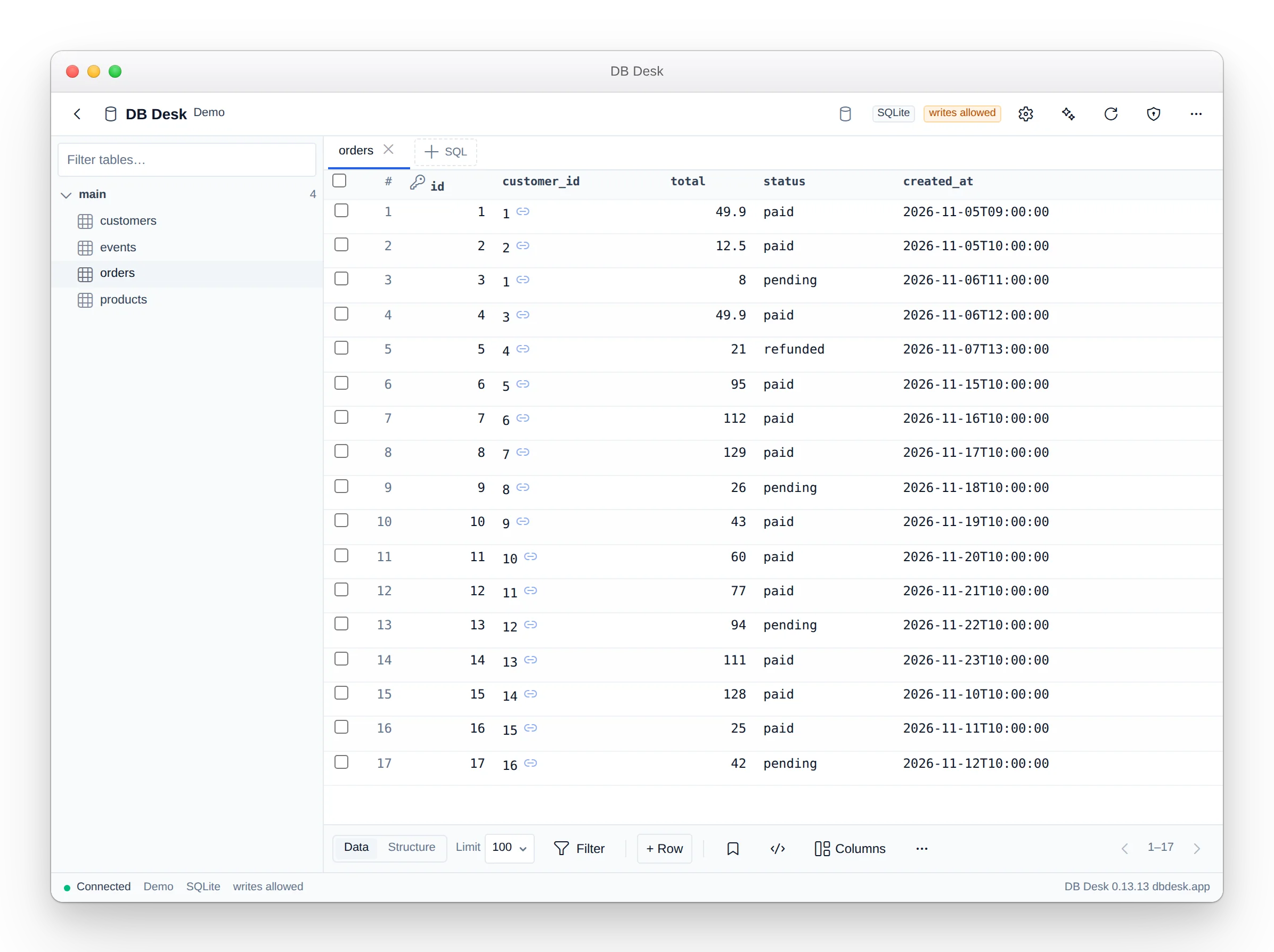
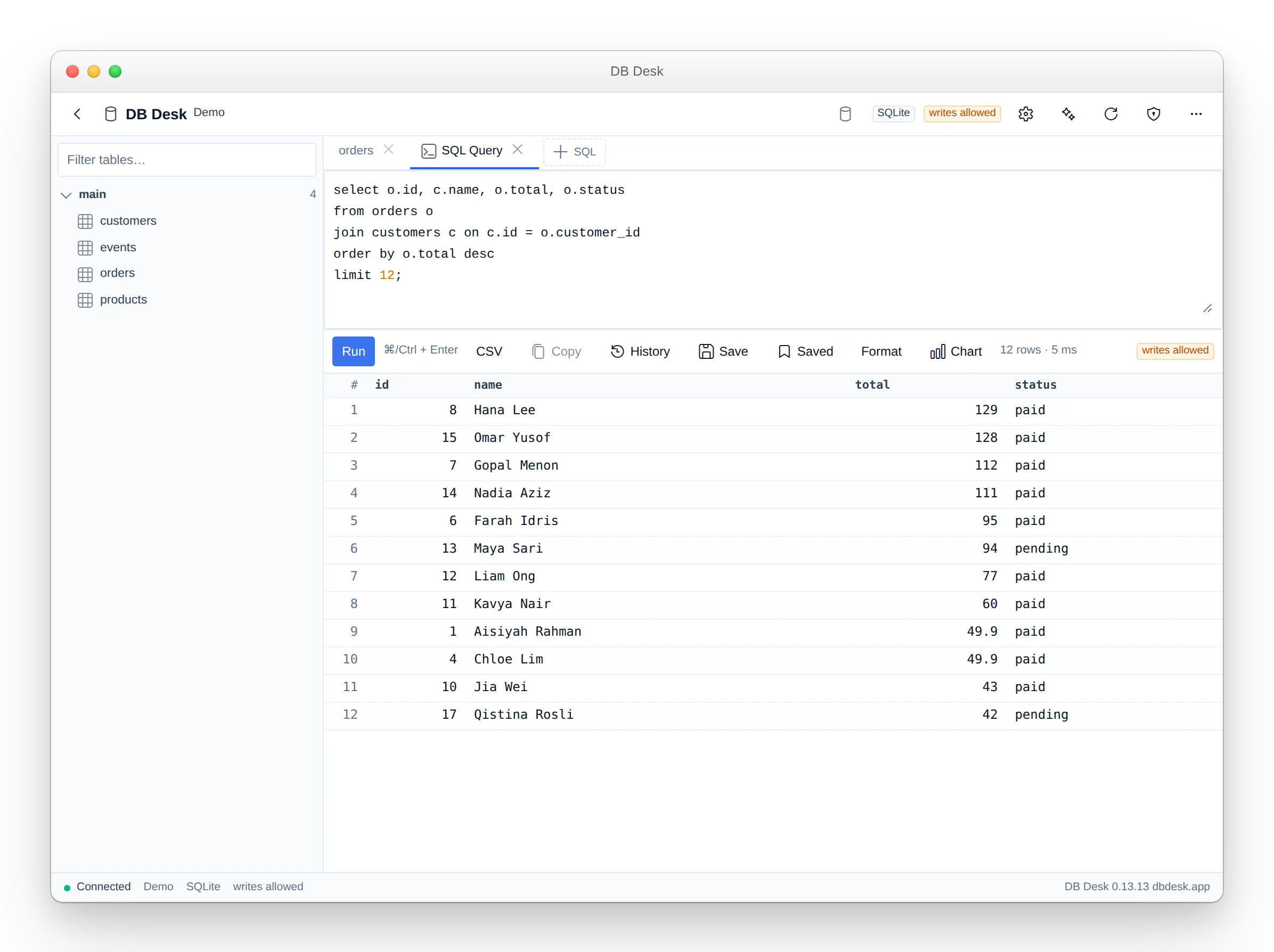
- MCP server for local agents — Settings → MCP server exposes DB Desk to Claude Desktop, Cursor, Hermes or any MCP client over stdio or loopback HTTP. Tools cover connections, databases, tables, columns, indexes, DDL, rows, CSV, SQL and the AI agent. Disabled by default; one toggle generates a bearer token.
- Keyboard shortcuts — ⌘F filter/search, ⌘R refresh, ⌘⏎ run, ⌘S save SQL, ⌘2 / ⌘T new SQL tab, ⌘1 / 3 / 4 Data/Structure/Site, ⌘+ / ⌘− / ⌘0 zoom, ⌘/ shortcut list, ⌘, settings.
- Remembers window size and position across launches (saved to
window.jsonin the app data folder); if the monitor is gone, the app falls back to the default size instead of opening off-screen. - Settings (⌘,) — one preferences window: Appearance (System / Light / Dark), updates, native notification toggle + test, MCP server, AI provider (base URL/model/key), backup & restore, application-data path and version. Open it with ⌘,, the gear on the picker, or the gear in the app header.
- AI setup assistant — AI setup on the picker: describe the database (“MySQL on my VPS behind a bastion”) and the agent returns a field-by-field draft; Use this setup opens the form prefilled. Passwords are never sent: the draft is sanitized server-side and the form leaves the password blank.
- Ask AI (read-only) — the header AI button opens a prompt bar. It sends the current table/column names and your question to an OpenAI-compatible endpoint (OpenAI, OpenRouter, Ollama, LM Studio, ...), receives one SELECT, runs it read-only and shows the SQL and rows. The panel is a chat: press Enter, read the result, then type a follow-up (“pecahkan ikut bulan”) and the previous SQL/answers are carried into the next request. If a statement fails (for example a wrong column name), the error and the relevant schema are sent back once so the model can correct the query. Server-side rules refuse any non-read statement. Configure base URL, model and API key under the AI settings; the key is encrypted at rest and row data is never sent.
- Multi-database agent — the AI scope bar defaults to every AI-enabled connection. When a question spans databases (“who is in app-db but not the warehouse?”) the agent first requests the missing schemas, then returns one read-only statement per database plus a join. DB Desk runs each statement against its own database, loads the result sets into an in-memory SQLite database and executes the join locally. Only schema names, SQL, row counts and error text go to the provider — never the rows. Each answer shows the per-source SQL (copy, or open in SQL when it is the current connection), the local join, the merged table and a short step log.
- Per-connection AI switches — in the connection form, turn off AI can see this schema to hide a database from the agent entirely, or turn off AI can run read-only queries to keep it inspect-only. Statements run by the agent are written to the audit log.
-
Docked AI and record panels — the AI chat opens on the right without covering the grid; clicking a row number opens a TablePlus-style Record panel on the right with each column name, type and value. Microsoft SQL Server. T-SQL is not MySQL with different keywords, and the parts that differ are the parts people notice:
-
identifiers are bracketed (
[dbo].[orders]) and literals areN'…', so a Unicode value survives the code-page round trip; - paging uses
ORDER BY … OFFSET n ROWS FETCH NEXT m ROWS ONLY, which requires an ORDER BY even when you did not pick a column, and TOP cannot be combined with it; - column types come from the catalog (
sys.columns), because the driver only reports five coarse DB-Library categories;timestampis rendered asrowversionsince it is a binary counter, not a date; contains/startswithpin a collation instead of inheriting the database default, so case-insensitivity does not change per server;- the driver is
pymssql, which ships wheels for every platform including Windows on ARM and bundles FreeTDS — there is no ODBC driver for the user to install. TLS is a connection setting (off,request,require,default); Azure SQL needsrequire. -
SQL Server has no read-only transaction mode to switch on, so read-only here means the statement guard plus, ideally, a login whose grants cannot write.
-
New connection type cards — the connection form shows a card per engine and sets the default port when you pick one. MariaDB is stored as MySQL with a
mariadbflavor. MongoDB has SRV and auth-source options; Redis has a database index.
Engines that speak a protocol DB Desk already speaks are names, not new drivers: PostgreSQL and everything on the PostgreSQL wire — Amazon Redshift (5439), CockroachDB (26257), Greenplum; MySQL, MariaDB and SingleStore; Microsoft SQL Server (bundled FreeTDS, no ODBC driver to install); ClickHouse; SQLite and DuckDB by file; MongoDB; Redis / Valkey.
Three more engines have their own protocol and their own module, because a dialect is not the only thing that differs:
- Oracle through
python-oracledb's thin driver — no Instant Client, noORACLE_HOME, nothing to install. Schemas are the owners you can see, the system owners are hidden, and a table isOWNER.TABLEin double quotes.TIMESTAMPcolumns andCLOBvalues are read as text, and DDL comes fromDBMS_METADATA.GET_DDL, which is what Oracle itself considers canonical. - Vertica through
vertica_python, also pure Python. Vertica has noCREATE INDEX: a projection is the physical design, so the indexes panel lists the projections that cover the table rather than pretending otherwise, and DDL comes fromEXPORT_OBJECTS(). - Cassandra speaks CQL. There is no
OFFSET, so the grid shows the first N rows and says so instead of paging wrongly;ORDER BYonly works on clustering columns and the server rejects anything else; column types are CQL types (list<uuid>,map<text,int>) shown as they are; and because Cassandra keeps no DDL text,CREATE TABLEis reconstructed fromsystem_schema, including the composite partition key and anyCLUSTERING ORDER BY … DESC.
Four cloud warehouses are reached over their own HTTPS APIs. None of them can be exercised without an account, so they are implemented against the published API and are not yet proven against a live account — treat them as available to try, not as tested. They take one extra field, Options (JSON):
- Amazon Athena — user is the access key id, password the secret key,
{"region": "ap-southeast-1", "output": "s3://bucket/prefix"}. Athena is asynchronous: the query is started, polled and read back, and its result set is written to that S3 prefix, which is why the prefix is required. - DynamoDB —
{"region": "ap-southeast-1"}(plusendpointfor DynamoDB Local). A table has no fixed columns, so the attribute list shows the keys and the rows are aScan; the Query tab accepts PartiQL. - BigQuery — user is the service-account e-mail and password its private key
(PEM),
{"project": "my-project", "dataset": "demo"}. The JWT is signed locally withcryptographyand exchanged for a token, so no Google SDK is bundled. - Snowflake — host is
account.snowflakecomputing.com,{"warehouse": "…", "role": "…", "schema": "…"}. This one uses Snowflake's own connector, imported only when a Snowflake connection is opened.
None of the four is signed in with a saved browser session or an OAuth popup: the credential is a key you paste, encrypted with the rest of the vault.
Four engines are reached over HTTP instead, with no driver at all: put the base
URL in Host and the token in Password.
- Elasticsearch — indices appear as tables, the mapping as columns, documents
as rows (nested fields flattened to a.b, _id shown). The Query tab uses the
_sql endpoint, which some distributions do not ship.
- InfluxDB 3 — database name plus a token; measurements appear as tables and
the Query tab runs SQL. The system schema is hidden. time is treated as the
default sort column.
- libSQL / Turso — libsql:// (or the https URL) plus a token; a SQLite-shaped
database, so tables, pragma table_info, DDL and SQL all work as expected.
- Cloudflare D1 — account id in User, database id in Database, API token
in Password.
Read-only applies to all of them: a write statement is refused before it leaves
the process, because a token that can write has no server-side grant to fall back on.
- MongoDB document browser — collections appear in the tree; the data grid
pages documents, the filter panel accepts column filters or a raw Mongo
filter object ({"age": {"$gt": 18}}), and the Query tab runs JSON commands
({"collection": "users", "find": {...}, "sort": {...}, "limit": 50} or
aggregate). Double-click a cell to edit a field, + Row inserts a
document, and row actions delete. Nested objects/arrays show as compact JSON.
Reads use the sampled field list; production writes go through the approval
drawer.
- Redis / Valkey browser — the tree lists the logical databases, the grid
scans keys (key, type, ttl, size) with a MATCH pattern filter, and
clicking a key opens a value drawer for strings, hashes, lists, sets, sorted
sets and streams. The Console tab runs any command (GET, HGETALL,
SCAN, ...); read-only connections refuse writes, and production writes ask
for approval first.
- Connection picker — the app opens on a TablePlus-style list: search,
groups, type icons, read-only/PROD badges; pick a connection, then the full
browser opens. Right-click a connection for Open / Edit / Clone / Test /
Export / Delete; Clone duplicates the encrypted credentials too. New connection goes straight to the form, and the chevron
in the header returns to the list.
- Connection rail — when more than one connection is open, a slim rail
appears on the left. Right-click an icon for Open / Edit connection / Close
connection / Close other connections / Close all connections. With a
single connection open the rail hides itself.
- Resume last connection — after you click the back chevron (or relaunch
the app), the picker shows a Continue where you left off banner for the
last connection you opened. One click returns to that explorer.
- Import / export & QR — export one connection from the share icon or all of
them from the picker as a .dbdesk bundle. Passwords are left out by default;
tick Include passwords to encrypt them with a passphrase (scrypt +
AES-GCM). Import accepts a file, pasted bundle or dbdesk:// link, shows a
preview, then merges with new ids. Show QR renders a scannable code for a
single connection (QR capacity is limited, so large bundles fall back to the
file/copy).
- Backup & restore (migration) — Settings → Backup all writes one file
with every connection, saved view and saved query. Passwords are optional and
encrypted (scrypt + AES-GCM). On the new Mac, Restore previews the file,
creates the connections, remaps views/queries to the new ids and leaves
passwords blank when they were not included.
- Structure grid — the Structure tab (bottom switcher) shows a TablePlus-style structure
grid: #, column, data type, character set, collation, nullable, default,
extra (auto-increment/identity), foreign key and comment, plus an index grid
(index_name, algorithm, unique, column). DDL is still available from the
DDL button but no longer the default view.
- SQL query tabs — SQL (or ⌘T) opens a dedicated query tab next to
the table tabs. Each tab keeps its own SQL text and result set, so a second
query does not overwrite the first; close a tab when you are done.
- Bottom data toolbar — Run, Limit, Filter, row metadata, view/SQL/column
actions, More menu and pagination sit under the grid, like TablePlus.
- TablePlus-style filters — each row has a checkbox, a Raw SQL / column
picker, a full-width pattern, Apply, − and +. Raw SQL rows append
a WHERE expression; column rows keep the operator/value controls. Apply
all enables every valid row, Clear unapplies the filters but keeps
their values (press Apply to re-enable), and SQL turns the active filters
into a SELECT. Saved views keep the flags.
- Flexible export — export the current table as CSV, JSON or SQL
INSERTs from the table right-click menu or the More menu. The export
respects the active filters and sort and caps at 50k rows (200k server cap).
- Quick panel (⌘P / Ctrl+P) — jump to a table, view, schema, function or
connection, or run actions such as New SQL tab, Toggle theme,
Settings and Close connection. Arrow keys + Enter work.
- SQL editor — syntax highlighting for keywords, strings, numbers, comments
and function calls. Autocomplete is alias-aware (c. lists the columns of
the table aliased c), knows every table referenced in FROM/JOIN, includes
table names, columns and functions, and supports fuzzy matching with a source
label. ⌘Space / Ctrl+Space opens the list manually; ↑/↓ + Tab/Enter
accepts.
- JSON editor — double-click a JSON/JSONB cell for a large modal with
Format, NULL, Cancel and Save; invalid JSON is rejected.
- AI autocomplete (on by default) — once an AI provider is configured,
press ⌘I / Ctrl+I in the SQL editor; turn it off under
Settings → AI provider if you prefer. The configured model returns
a continuation at the caret; Tab inserts it and Esc dismisses it. Only
the SQL text and schema metadata are sent — never rows or secrets.
- Model detection — in Settings → AI provider, enter the base URL and
API key and press Detect models. The model field turns into a picker of
the models the provider reports, with Type to go back to a custom name.
- Saved query buttons — the SQL toolbar has Save (name + current SQL)
and Saved (opens the snippet list); the same snippets are available to the
MCP agent through queries_list / query_save / query_delete.
- Everything the plugin page does:
- connections (PostgreSQL, Redshift, CockroachDB, Greenplum, MySQL/MariaDB, SingleStore, SQL Server, ClickHouse, SQLite, DuckDB, Elasticsearch, InfluxDB 3, libSQL, Cloudflare D1, Oracle, Vertica, Cassandra, Amazon Athena, DynamoDB, BigQuery, Snowflake, MongoDB, Redis/Valkey) with SSH tunnels, custom tunnel commands, MCP query tools and HTTP gateways
- schema tree, typed data grid, inline editing, filters, tabs, saved views
- SQL runner, autocomplete, formatter, history, saved queries, charts
- structure grid (columns + indexes) with on-demand DDL, cross-connection diff, add/drop/rename column, index editor
- CSV import and whole-table export
- serialized-PHP tools and the WordPress Site tab
- read-only guard, production approvals and the write audit log
- Activity drawer
Notes for the standalone build:
- Native macOS notifications — approval requests and production writes show a system notification while the app is running. Nothing is sent to Telegram or any external service. Approve writes in the Approvals drawer; test with Settings → Notifications → Test. Because the build is ad-hoc signed (no Apple Developer ID), macOS ties the notification permission to the current signature and drops it after every update. Open System Settings → Notifications → DB Desk, enable it and choose Alerts; the Settings panel has a shortcut plus diagnostics. The Fallback test posts through Script Editor for setups where native delivery still fails. With a Developer ID build the permission survives updates.
- MCP connections work directly. Add the streamable-HTTP endpoint
(e.g.
https://mcp.example.com/mcp), the tool name and SQL argument, then Authorize: DB Desk runs OAuth 2.1 with PKCE through a loopback redirect, opens the system browser, stores the tokens encrypted and refreshes them automatically. No token pasting. Unauthenticated MCP servers also work; Hermes-style named MCP servers still work in the plugin. - SQLite needs the file on this machine (no upload).